
Chapter 9
Interoperability
An analysis rarely starts and ends in one package. This chapter shows how event data enter spmviz — from pandas tables, SPMF files, XES logs and pm4py — how other miners can be used in place of the built-in ones, and how patterns, measures and graphs leave the package for pandas, spreadsheets, SPMF, NetworkX, Gephi, Cytoscape, igraph and the web.
9.1 Problem and idea
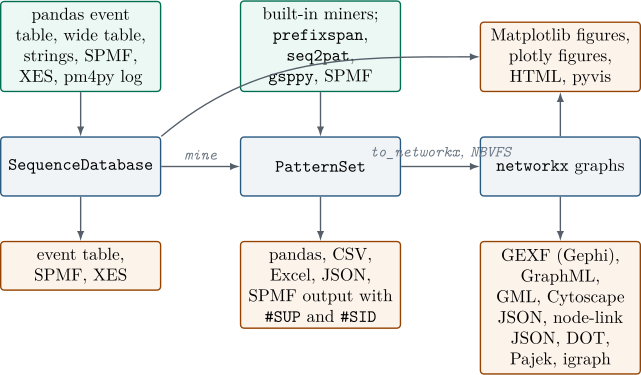
Sequential pattern mining has excellent tools: the SPMF library implements more than two hundred algorithms in Java [28], pm4py is the process-mining library of Python [80], Seq2Pat solves constraint-based mining with decision diagrams [26], and network analysis has NetworkX, igraph, Gephi and Cytoscape [23, 78, 79]. The original NBVFS scripts already combined SPMF, pandas, NetworkX and pyvis through intermediate CSV files [5]. spmviz replaces the files by two objects with a stable interface, SequenceDatabase and PatternSet, and by NetworkX graphs whose nodes carry every attribute a view uses. Whatever reads or writes these three kinds of objects can be combined with every view of the book (fig. 9.1).
9.2 Data in
Most event data arrive as a long table with a case identifier, an activity and a timestamp. SequenceDatabase.from_event_log(df, case, activity, timestamp) groups the rows by case, orders them by time (or keeps the order of the table with sort=False), merges events with equal timestamps into itemsets if asked, keeps the timestamps in seconds and the other columns of the first row of every case as attributes. Timestamps may be strings, Python or pandas datetimes, time-zone aware or not; aware ones are converted to UTC. from_wide reads one sequence per row, from_strings one per string, from_spmf the SPMF input format (with the @CONVERTED_FROM_TEXT header for text items), io.read_xes the IEEE XES standard of process mining, and from_pm4py a pm4py event log or data frame. to_event_log, io.write_spmf and io.write_xes write a database back.
log = pd.DataFrame({
    "case":     [1, 1, 1, 2, 2, 3, 3, 3],
    "activity": ["login", "search", "buy", "login", "search", "login", "search", "buy"],
    "time":     pd.to_datetime(["2026-01-01 10:00", "2026-01-01 10:02", "2026-01-01 10:09",
                                "2026-01-02 09:00", "2026-01-02 09:01",
                                "2026-01-03 18:00", "2026-01-03 18:05", "2026-01-03 18:06"]),
})
db = sv.SequenceDatabase.from_event_log(log, case="case", activity="activity", timestamp="time")
ps = sv.mine(db, min_support=2)
print(ps.to_frame()[["pattern", "support", "confidence"]])
9.3 Other miners
sv.mine(db, ..., algorithm=name) also runs external miners and returns their result as a PatternSet; the supporting sequences are computed when the miner does not report them, so every view works on the result. Four back ends are available (spmviz.backends.available() lists the installed ones):
- "prefixspan-py": the prefixspanpackage [25], with closed, generator and top- variants; sequences of single items, no gap constraints;
- "seq2pat": Seq2Pat [26], constraint-based mining of sequences of single items;
- "gsppy": the GSP-Py package [27]; version 5.3 returned the same supports as the built-in miners but missed some patterns that repeat an item, such as ;
- "spmf": the SPMF library [28], called through Java with a user-supplied spmf.jar (CM-SPAM, PrefixSpan, or any algorithm with explicit arguments); backends.spmf_command prints the command line, so that SPMF can also be run by hand and its output read with io.read_patterns.
Comparing a back end with the built-in miners is a one-line check (section 2.6): two pattern sets are identical when their patterns and supports are.
9.4 Results out
ps.to_frame() returns the patterns as a pandas data frame with every measure; ps.write(path) writes CSV, JSON, Excel or the SPMF output format with #SUP and #SID fields, chosen by the extension, and io.read_patterns reads them back, with the supporting sequences when present. Text items are coded in SPMF files with @ITEM lines, so items with spaces survive the round trip.
sv.io.write_spmf(db, tmp / "db.txt")                 # SPMF input format (text items coded)
ps.write(tmp / "patterns.txt")                       # SPMF output: #SUP and #SID
ps.write(tmp / "patterns.json")
back = sv.io.read_patterns(tmp / "patterns.json", db)
print((tmp / "patterns.txt").read_text())
Every network of the book is a NetworkX graph: the extension network, the lattice and the similarity graph of a pattern set (ps.to_networkx(kind)), the fitted NBVFS views, prefix trees, transition graphs and higher-order networks. Their nodes carry the support, relative support, length, confidence, cumulative confidence, start event and added event of the patterns, and the layouts store coordinates x and y. io.write_graph (and NBVFS.write) chooses the format by the extension (table 9.1); GEXF files carry Gephi’s position, color and size attributes, so a map opens in Gephi as it was drawn. io.to_igraph and io.from_igraph convert to and from igraph.
G = ps.to_networkx("extension") # a networkx.DiGraph print(G.nodes["login search"]) wn = sv.NBVFS("wn").fit(ps) for ext in ("gexf", "graphml", "cyjs", "json"): wn.write(tmp / f"network.{ext}") # with x, y, support, confidence, ... H = sv.io.read_graph(tmp / "network.graphml") print(sorted(H.nodes(data=True))[0])
| Extension | Format | Typical use |
| .gexf | GEXF 1.2 with viz attributes | Gephi, with positions, colors and sizes |
| .graphml | GraphML | yEd, Cytoscape, igraph, R |
| .gml | GML | older network tools |
| .cyjs | Cytoscape JSON with positions | Cytoscape and Cytoscape.js |
| .json | NetworkX node-link JSON | web pages, D3 |
| .dot | Graphviz | typeset drawings |
| .net | Pajek | Pajek, older tools |
| .csv, .xlsx | node and edge tables | spreadsheets, databases |
9.5 Interactive figures
The static views of the book are Matplotlib figures, which suit print and reports. For exploration, spmviz.interactive returns plotly figures: zoomable sunbursts, icicles and treemaps of the prefix tree, Sankey diagrams, and NBVFS maps and other networks with hover information on every node. fig.write_html(path) writes a standalone page. interactive.to_pyvis reproduces the draggable physics view of the original NBVFS scripts [5]. In the online documentation every example runs as a Jupyter notebook, so the interactive figures can be explored there as well.
fig = interactive.sunburst_figure(db, max_depth=6)
fig
In a nutshell: Interoperability
- Event tables, wide tables, strings, SPMF, XES and pm4py logs become a SequenceDatabase.
- The prefixspan, seq2pat and gsppy packages and SPMF can replace the built-in miners; their results are PatternSets.
- Patterns go to pandas, CSV, Excel, JSON and SPMF; graphs to GEXF, GraphML, Cytoscape JSON and six other formats, with all attributes and positions.
- Interactive plotly and pyvis versions exist for trees, flows and maps.